
Interfaces / Language / microarticle
You Don’t Know You’re Thinking
01 / Looks easy
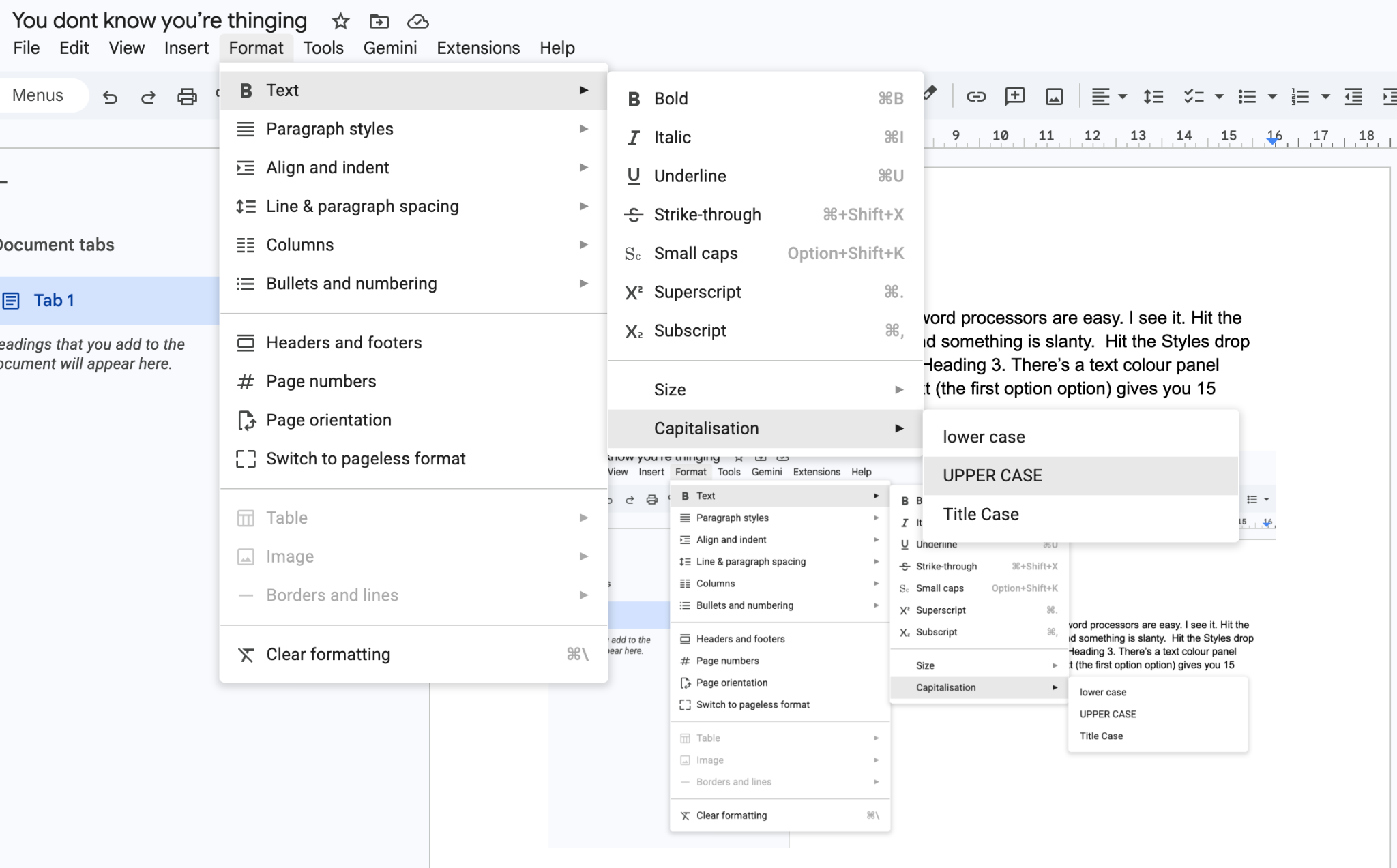
People think word processors are easy. I see it. Hit the thick B and something is bold. Hit the I and something is slanty. Open the Styles dropdown: Title, Heading 1, Heading 2, Heading 3. There’s a text colour panel somewhere. Format opens another menu. Text opens another. Capitalisation opens another.
02 / You’re already calculating
Sometimes the function is visible. Sometimes it’s buried in menus. Sometimes it only appears in a particular context. Select something, move the mouse, find the function, click it, move back. Remember what you were writing.
Have you ever deleted five words, corrected something, then retyped the words because that was easier? That’s an on-the-spot cost-benefit analysis. Reconstructing the text cost less effort than navigating the precise edit.
You’re thinking. You’re just not used to counting this as thinking.
03 / It’s not easy, it’s familiar
Then you forget which Style applies to this bit of text. You choose the wrong one. Thirty-five pages later, you’re checking where else you did it.
Styles are useful. They record structure and keep formatting consistent. You still have to remember which structure you meant, apply it correctly and notice when you haven’t.
You’ve learned the tool well enough to stop noticing much of that work. Familiarity makes the effort less visible. It doesn’t make it disappear.
04 / Keyboard shortcuts are another little language
For people who type a lot, live in documents and need speed and precision, there are keyboard shortcuts. ⌘B means something to a Mac user. Ctrl+B means something to a Windows user. A small combination of symbols invokes an operation in a known context.
Sound familiar?
You’ve learned vocabulary, combinations and rules. You use them to express an instruction without explaining every step. Keyboard shortcuts are another little language. You already use one to avoid the menus.
05 / Describe the work. Check the relationships.
For long documents and repeatable production, markup lets us state structure explicitly. TeX and LaTeX give us machinery for turning that structure into typeset documents. GraphicNovel builds on LaTeX using the language of comic scripts: characters, eras, pages, panels and dialogue.
The useful part goes beyond formatting. The tool can check whether the character exists, whether an appearance has been defined for the relevant era, and whether the references agree. Some of the remembering becomes the tool’s job.